
Google Business Profile Posts: Weekly Ideas for Local Businesses
Not sure what to post on your Google Business Profile? Use these weekly post ideas to promote services, offers, events and helpful updates.
WebWise Management
6/3/20268 min read
Google Business Profile Posts: What to Post Every Week as a Local Business
Why Google Business Profile Posts Matter
Your Google Business Profile is often one of the first places local customers see your business. They may find you while searching on Google Maps, comparing options in the local results, checking your hours, reading reviews or deciding whether to call.
But many businesses treat their profile like a static directory listing. They add their name, phone number, address and opening hours, then leave it untouched for months. That is a missed opportunity.
Google Business Profile posts allow you to share announcements, offers, updates and event details directly with customers on Google Search and Maps. Google says these posts can help customers decide whether to visit your business, and they can include text, photos or videos. Posts may appear in places such as the “Updates” or “Overview” tabs on mobile and the “From the owner” section on desktop.
For a local business, this means your profile can do more than list your details. It can promote services, answer common questions, highlight offers, share helpful advice and send people to your website or booking page.
The challenge is knowing what to post on Google Business every week. The good news is that you do not need a complicated content strategy. You need a simple rotation of useful, timely and customer-focused updates.
What Types of Posts Can You Create?
Google currently lists three main types of Business Profile posts: Updates, Offers and Events. Each has a different purpose.
Updates
Update posts are the most flexible. Google says they can include a description, photo, video and an action button with a link. That button should send customers somewhere they can complete an action, such as making a booking, ordering online or learning more.
Use update posts for:
Service highlights.
Helpful tips.
Blog links.
Seasonal reminders.
New product or service announcements.
Behind-the-scenes updates.
Recent project highlights.
Customer reminders.
Offers
Offer posts are designed for promotions, specials and deals. Google says offers require a title, dates and time, and automatically include a “View Offer” button. You can also add a description, photo, video, coupon code, link, terms and conditions.
Use offer posts for:
Discounts.
Seasonal deals.
Limited-time packages.
Free consultations.
Introductory offers.
Product specials.
Service bundles.
Events
Event posts promote events at your business. Google says event posts require a title and start and end dates. They can also include times, a description, photo, video and an action button.
Use event posts for:
Workshops.
Open days.
Launches.
In-store events.
Webinars.
Training sessions.
Community activities.
Seasonal events.
Google also notes that posts older than six months are archived unless a date range is set, so regular posting helps keep your profile current.
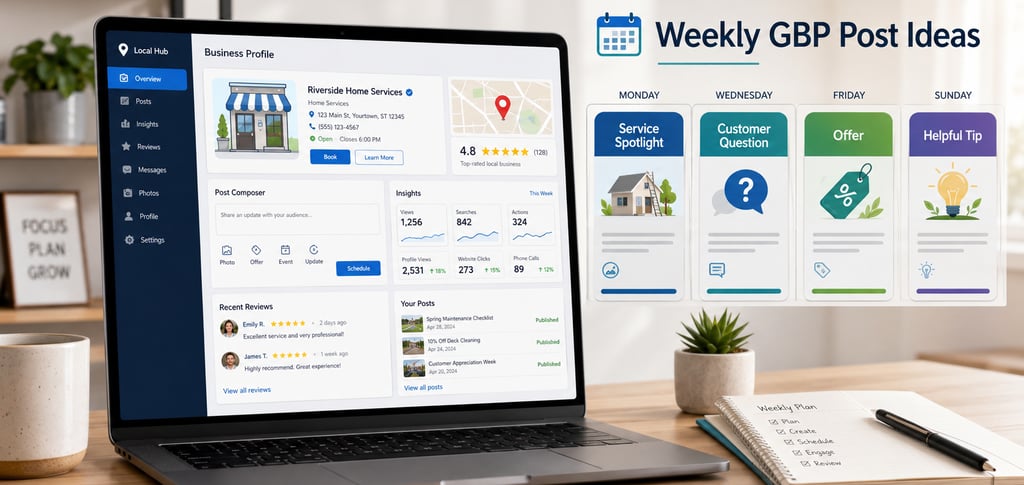
Weekly Post Idea 1: Service Spotlight
A service spotlight is one of the easiest Google posts ideas for local businesses. Choose one service each week and explain what it is, who it helps and why someone might need it.
For example, a plumber could post:
Title: Geyser Repairs and Replacements
Description: No hot water or signs of a leaking geyser? Our team can assess the issue, explain your repair or replacement options and help you get hot water back as quickly as possible.
Button: Learn More or Call Now
A salon could post:
Title: Colour Refresh Appointments
Description: Is your colour looking dull or faded? Book a colour refresh to restore shine, tone and confidence before your next event.
Button: Book
A website company could post:
Title: Website Maintenance for Small Businesses
Description: Keep your website updated, secure and ready to convert visitors with regular maintenance from WebWise Management.
Button: Learn More
Service spotlights work because they remind customers what you do. Many people may know your business name but not understand your full range of services. A weekly service post helps educate them without sounding pushy.
Community or Local Updates
Local businesses can build connection by sharing community involvement.
Example:
“We’re proud to support this weekend’s local market. Visit our stand for product demonstrations and special offers.”
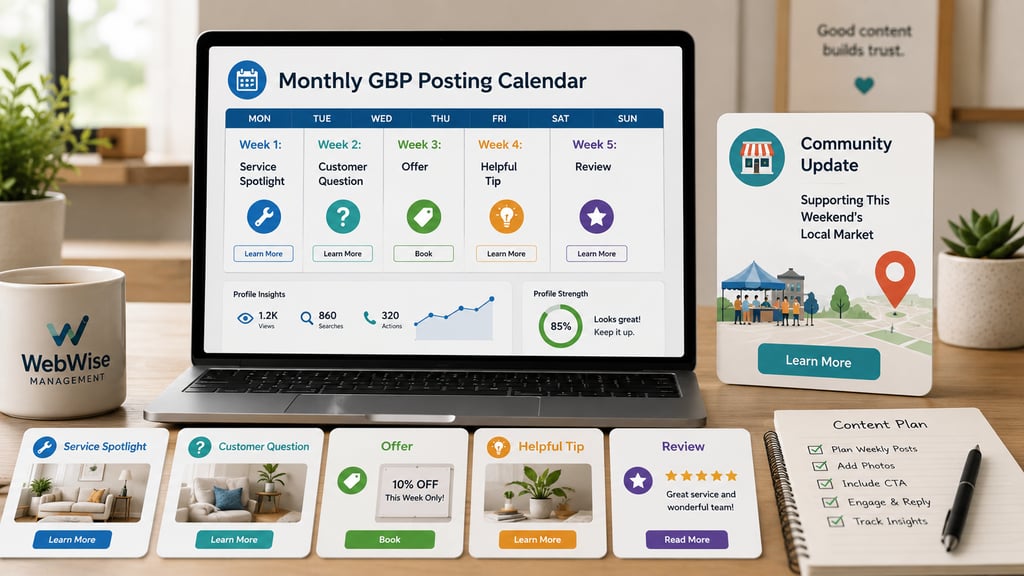
Monthly GBP Posting Calendar
Here is a simple GBP content calendar you can repeat every month.
Week 1: Service Spotlight
Post type: Update
Topic: Highlight one core service.
Example: “Website Maintenance for Small Businesses”
CTA: Learn More or Book
Week 2: Customer Question
Post type: Update
Topic: Answer a common FAQ.
Example: “How often should I update my website?”
CTA: Learn More or Contact Us
Week 3: Offer or Promotion
Post type: Offer
Topic: Limited-time deal or service package.
Example: “Free Website Review This Month”
CTA: View Offer or Book
Week 4: Blog, Tip or Seasonal Reminder
Post type: Update
Topic: Share a blog post, useful tip or seasonal reminder.
Example: “Before running ads, check these 15 website fixes.”
CTA: Learn More
Optional Week 5: Review or Behind-the-Scenes Post
Some months have five posting weeks. Use the extra week for a review highlight, team photo, recent project or community update.
This calendar gives you a realistic rhythm. You are not trying to invent something new every few days. You are rotating through categories that support visibility, trust and action.
Mistakes to Avoid with Google Posts
Google posts are simple, but there are still common mistakes that can reduce their effectiveness.
Posting Without a Clear Purpose
Every post should have a job. It might educate, promote, reassure, announce or drive a click. Avoid posting just to fill space.
Using Weak Images
A poor-quality image can make your business look less professional. Use clear, relevant photos of your team, products, services, premises or completed work.
Forgetting the Call-to-Action
If you want someone to book, call, order or learn more, make that next step obvious. Google allows update posts to include an action button with a link, so use that feature strategically.
Including Phone Numbers in Post Descriptions
Google notes that posts containing a phone number in the post description may be rejected. Add phone numbers to the correct Business Profile fields rather than trying to place them in post copy.
Letting Posts Become Outdated
Do not leave expired offers, old event details or outdated announcements visible without review. Google says posts older than six months are archived unless a date range is set, but you should still edit or delete posts when information changes.
Making Every Post a Sales Pitch
Offers are useful, but not every post should be promotional. Mix sales posts with education, FAQs, tips, reviews and service explanations.
Linking to the Wrong Page
If your post promotes a booking, link to the booking page. If it promotes a blog, link to the blog. If it promotes a specific service, link to that service page. Sending every click to your homepage creates unnecessary friction.
How WebWise Can Help
Posting weekly sounds simple, but consistency is where many businesses struggle. You may know your services well, but still find it hard to write posts, choose images, create offers, update your profile and track what is working.
WebWise Management can help manage your Google Business Profile so it stays active, accurate and customer-focused. That can include planning a monthly posting calendar, writing Google Business Profile posts, creating service highlights, sharing blog links, developing offers, updating profile information and helping your profile support more calls, clicks and enquiries.
The goal is not to post for the sake of posting. The goal is to use your profile as a practical marketing channel that supports local visibility and customer action.
Final Thoughts
Your Google Business Profile should not be a static listing. With regular posts, it can become a useful touchpoint that educates customers, promotes services, shares offers and encourages action.
Start with one post per week. Rotate between service spotlights, customer questions, offers and helpful tips. Add seasonal reminders, blog links, review highlights and behind-the-scenes updates for variety. Keep your posts clear, current and connected to a next step.
Need help keeping your profile active every month? Contact WebWise Management for Google Business Profile management that helps your local business stay visible, helpful and ready to convert searchers into customers.
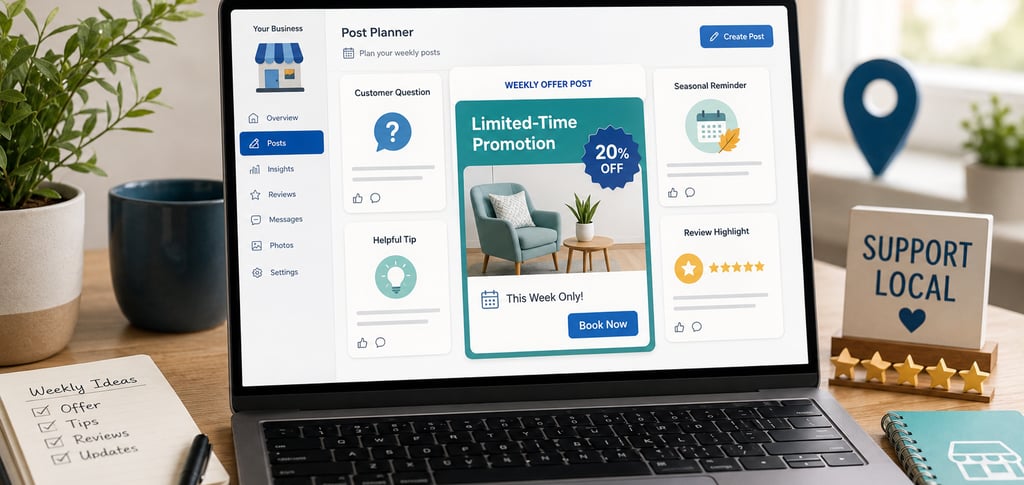
Weekly Post Idea 2: Offer or Promotion
Offers give customers a reason to act now. They work especially well for businesses with seasonal services, repeat customers or limited-time campaigns.
Examples include:
“Free website review this month.”
“Winter tyre check special.”
“Book a facial and receive a complimentary skin consultation.”
“Spring garden cleanup package.”
“First-time customer discount.”
“Two-for-one coffee before 10am.”
“Free quote for local roof repairs.”
A strong offer post should include:
A clear title.
The offer details.
Start and end dates.
Any terms or conditions.
A strong image.
A relevant link or action.
Avoid vague promotions like “Great deals available.” Be specific. Customers should immediately understand what they get and how to claim it.
For example:
Title: Free Website Health Check
Description: Not sure whether your website is costing you leads? Book a free website health check with WebWise Management this month and get practical recommendations.
Terms: One free review per business.
Button: Book
Weekly Post Idea 3: Customer Question
Customer questions make excellent GBP posts because they address real hesitation. These posts are also easy to create because they come from conversations you already have with customers.
A mechanic might post:
Question: How often should I check my tyres?
Answer: We recommend checking tyre pressure and tread at least once a month, and before long trips. If your tyres look unevenly worn or your car pulls to one side, book a fitment check.
A travel agent might post:
Question: When should I book December holidays?
Answer: The earlier you plan, the more choice you usually have for flights and accommodation. Speak to us about family-friendly options before peak-season availability becomes limited.
A web design company might post:
Question: Do I need a full website redesign?
Answer: Not always. Sometimes clearer service pages, faster loading times and stronger calls-to-action can improve performance without rebuilding everything.
This type of post builds trust because it shows you understand your customers’ concerns. It also creates helpful content that can be reused on your website, social media and email newsletters.
Weekly Post Idea 4: Blog or Helpful Tip
If your business publishes blog posts, your Google Business Profile is a natural place to share them. A blog link post gives searchers a reason to visit your website and learn more before enquiring.
For example:
Title: Why Your Website Gets Visitors but No Leads
Description: Getting traffic but no calls, bookings or form submissions? Our latest guide explains common website problems that stop visitors from becoming enquiries.
Button: Learn More
You can also share short tips without linking to a blog.
Examples:
“Tip: Update your Google Business Profile holiday hours before long weekends.”
“Tip: Compress website images before uploading them to improve page speed.”
“Tip: Ask customers for reviews shortly after a positive experience.”
“Tip: Check your tyres before a road trip.”
“Tip: Book salon appointments early before holiday periods.”
Helpful tips position your business as useful and trustworthy. They also keep your profile active even when you do not have an offer or event to promote.
Bonus Post Ideas for Local Businesses
Once you have the four weekly basics, add variety with these extra ideas.
Behind-the-Scenes Updates
Show your team preparing for the day, working on a project, setting up an event or improving your premises. These posts make your business feel active and human.
Example:
“Our team is preparing new product displays for the weekend. Visit us in-store to see what’s new.”
Review Highlights
Share a short customer review or testimonial, as long as you do it respectfully and do not reveal private information.
Example:
“Thank you to our customers for the kind feedback this week. We’re proud to be known for friendly service, clear communication and reliable workmanship.”
Seasonal Reminders
Seasonal posts are useful because they connect your services to timing.
Examples:
“Prepare your website for holiday trading.”
“Book your air-conditioning service before summer.”
“Check your tyres before winter travel.”
“Refresh your hair colour before year-end functions.”
“Update your Google Business Profile hours before public holidays.”
Recent Work or Project Highlights
Show completed work, before-and-after examples, new installations or finished client projects.
Example:
“We recently helped a local business refresh its website homepage with clearer messaging and stronger enquiry buttons.”
Contact
Reach out anytime for personalized support.
Email:
Phone:
+27 72 709 7557
© 2026. All rights reserved.