
Chatbots for Local Businesses: AI Customer Service That Saves Time
Learn how chatbots can handle routine customer enquiries, book appointments and free up staff time for small businesses.
WebWise Management
6/12/20267 min read
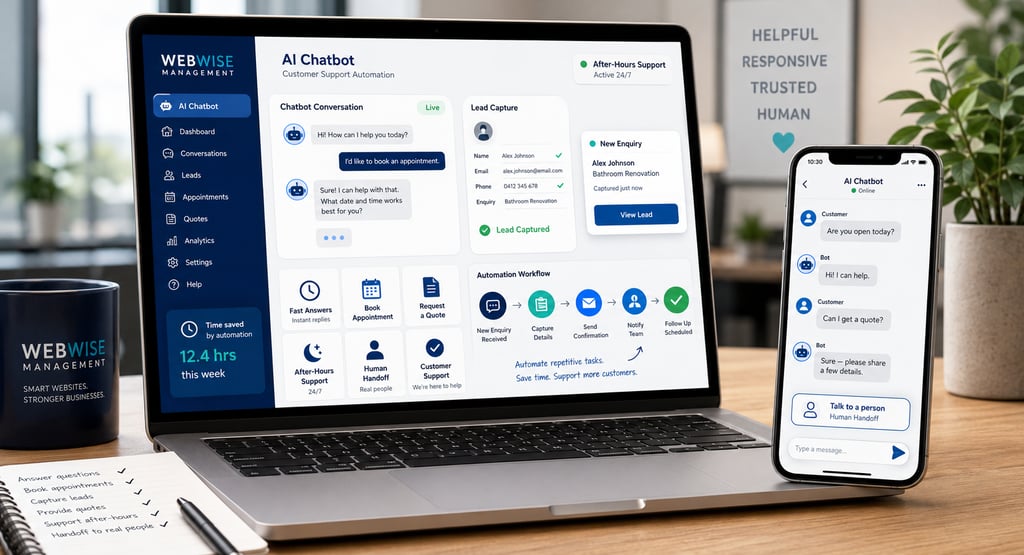
Chatbots for Local Businesses: How AI Customer Service Can Boost Leads and Save Time
What Is a Chatbot and Why Local Businesses Need One
A chatbot is a digital assistant that can answer customer questions, guide visitors to the right information, collect enquiry details and, in some cases, help people book appointments or request quotes. It can live on your website, Facebook Messenger, Instagram, WhatsApp or other communication channels.
For local businesses, this matters because customers often want fast answers before they decide whether to call, book or buy. A potential customer may ask:
Are you open today?
Do you offer this service in my area?
How much does it cost?
Can I book an appointment?
Do you have this product in stock?
What information do you need for a quote?
If nobody replies quickly, that customer may move on. A chatbot helps your business respond immediately, even when your team is busy, closed or handling other customers.
This does not mean replacing human care. The best chatbots for small businesses work alongside people. They handle routine questions, collect details and guide customers to the next step, while your team handles complex, sensitive or high-value conversations.
AI chatbot adoption is growing quickly. ChatBot.com’s 2026 statistics roundup reports that more than 987 million people worldwide use AI chatbots, and that chatbot adoption across businesses grew about 4.7 times between 2020 and 2025. The same source notes that AI chatbots can manage up to 80% of routine customer questions and enquiries. (chatbot.com)
For small businesses with limited time and staff, that can be a major advantage.
Customer Preferences: Why Speed Matters
Customers are not always looking for a long conversation. Often, they want a quick answer.
Tidio’s AI customer service data reports that 62% of customers would use a chatbot rather than wait for a human agent if the chatbot is faster. Tidio also reports that 69% of customers are fully satisfied with chatbot interactions, showing that many customers are comfortable using bots for simple support. (tidio.com, tidio.com)
Other chatbot research roundups commonly report that 74% of internet users prefer chatbots for simple questions, especially when checking store hours, product details or order status. (envive.ai)
The reason is practical: speed builds confidence.
Imagine a local clinic. A patient visits the website after hours and wants to know whether appointments are available on Saturday. A chatbot can answer immediately or collect the patient’s details for follow-up.
Or imagine a home service business. A customer notices a leak at night and wants to know whether emergency callouts are available. A chatbot can confirm service areas, explain the next step and collect the address before staff respond.
In both cases, the chatbot does not replace the business. It keeps the lead warm.
Tasks Chatbots Can Handle
The best local business chatbots are not trying to do everything. They are designed around common customer actions.
FAQs
Chatbots are ideal for frequently asked questions, such as:
What are your opening hours?
Where are you located?
Which areas do you serve?
Do you offer emergency services?
What payment methods do you accept?
How do I book?
What information do you need for a quote?
These questions are important, but answering them repeatedly can take time. A chatbot gives consistent answers instantly.
Measuring Success and Improving Performance
A chatbot is not a set-and-forget tool. It should be reviewed and improved over time.
Track:
Number of conversations.
Most common questions.
Leads captured.
Bookings started.
Quote requests submitted.
Drop-off points.
Questions the bot could not answer.
Human handoff frequency.
Customer satisfaction, where available.
These insights can improve your website, service pages and FAQs. If many customers ask the same question, that information should probably appear more clearly on your website too.
For example, if customers keep asking whether you serve a certain suburb, add that area to your service area page. If customers ask about pricing, add clearer pricing guidance or explain what affects cost. If customers ask about appointment availability, make booking links more visible.
In this way, chatbots do more than answer questions. They reveal what customers need to know before they buy.
Best Practices for Small Business Chatbots
To automate customer support effectively, keep the chatbot simple and customer-focused.
Avoid trying to make the bot sound too clever. Customers do not need personality more than they need useful answers.
Use plain language.
Offer clear choices.
Keep answers short.
Make contact options easy.
Update information regularly.
Test the chatbot on mobile.
Provide a human handoff.
Review unanswered questions monthly.
Avoid collecting unnecessary personal information.
Be transparent that customers are speaking with a bot.
A chatbot should reduce friction, not add it. If customers feel confused, trapped or ignored, the bot is doing more harm than good.
How WebWise Management Can Help Implement Chatbots
Many small businesses like the idea of a chatbot but are unsure where to start. The challenge is not only choosing the tool. It is planning the conversation, writing the responses, connecting the chatbot to your website or social channels and making sure it supports real business goals.
WebWise Management can help you plan and implement a chatbot that fits your business. This can include:
Identifying common customer questions.
Designing conversation flows.
Writing friendly chatbot responses.
Setting up website chatbot integration.
Connecting enquiry forms or booking links.
Creating handoff rules.
Aligning chatbot answers with your service pages.
Testing the chatbot on desktop and mobile.
Reviewing performance and improving responses.
The goal is not to replace your team. The goal is to help your team save time, respond faster and capture more enquiries.
For a local business, even a simple chatbot can make a difference. It can answer after-hours questions, guide visitors to the right service, collect contact details and reduce repetitive admin.
Final Thoughts
Chatbots are becoming a practical tool for local businesses, not just large companies. Customers want quick answers, and small teams often do not have the time to respond instantly across every channel.
A well-planned chatbot can handle routine FAQs, support bookings, collect quote details and provide after-hours assistance. It can free up staff time while still giving customers a helpful experience.
The most successful chatbots are not cold or robotic. They are clear, useful and connected to real human support when needed.
Ready to make customer enquiries easier to manage? Contact WebWise Management to discuss chatbot integration for your website, social media or customer support process. We can help you set up an AI customer service solution that saves time, captures leads and supports better service.


Bookings and Appointment Requests
For salons, clinics, consultants, repair companies and service providers, chatbots can help customers start the booking process. Depending on the setup, the bot can link to a booking page, ask for preferred dates or collect basic appointment details.
For example:
“Which service would you like to book?”
“What day works best for you?”
“Please provide your name and contact number so our team can confirm availability.”
Even if the chatbot does not complete the booking automatically, it can reduce the number of missed enquiries.
Quote Requests
Many local businesses need specific information before giving a quote. A chatbot can collect those details in a structured way.
A property maintenance company might ask:
What type of service do you need?
What area are you in?
Is the request urgent?
Can you upload a photo?
What is your contact number?
This saves staff time and helps the customer provide the right information upfront.
Product or Service Guidance
Retail shops, fitment centres and service providers can use chatbots to guide people toward the right product or service.
For example, a fitment centre chatbot could ask whether the customer needs tyres, batteries, wheel alignment or accessories. A website agency chatbot could ask whether the visitor needs a new website, website maintenance, SEO or Google Business Profile support.
After-Hours Support
One of the biggest benefits of AI customer service bots is availability. Customers often browse outside normal office hours. A chatbot can answer simple questions, collect leads and explain when a human will respond.
This helps your business avoid losing enquiries simply because the customer arrived at the wrong time.
Integrating a Chatbot Into Your Website and Social Media
A chatbot works best when it is part of your wider customer journey, not just a pop-up added to your website without planning.
Start by deciding where your customers already contact you. For many small businesses, that may include:
Website chat.
Facebook Messenger.
Instagram DMs.
WhatsApp.
Google Business Profile links.
Contact forms.
Then decide what the chatbot should do. Do you want it to answer questions, collect leads, book appointments, recommend services or route customers to the right person?
A good chatbot setup should include:
A friendly welcome message.
Clear menu options.
Answers to common questions.
Service or product guidance.
Lead capture fields.
Booking or quote links.
Human handoff options.
Privacy-conscious data handling.
Testing before launch.
For example, a website chatbot might open with:
“Hi, welcome to WebWise Management. How can we help today?”
Then offer buttons:
I need a new website.
I need help with SEO.
I want to improve my Google Business Profile.
I need social media management.
I have another question.
This gives visitors an easy path instead of forcing them to type everything from scratch.
Handoff to Human Agents When Needed
A chatbot should never trap customers in a loop. If the question is complex, sensitive or emotional, a human should take over.
This is especially important for clinics, legal services, finance-related businesses, complaint handling, technical support and high-value sales conversations.
Avaya’s 2026 customer experience statistics report that 69% of consumers believe it is very important for AI and human agents to work together to help customers better, rather than AI replacing people. The same source notes that customers still prefer humans for sensitive or diagnostic issues. (avaya.com)
A good handoff process should explain what happens next:
“Thanks for sharing those details. This is best handled by our team. Please leave your phone number, and we’ll contact you during business hours.”
Or:
“I can connect you with a human team member. Our team usually responds between 8am and 5pm, Monday to Friday.”
The chatbot should also pass the conversation history to the human team where possible. Customers do not want to repeat everything they already typed.


Contact
Reach out anytime for personalized support.
Email:
Phone:
+27 72 709 7557
© 2026. All rights reserved.